
En
Ln
Get help with payments, funding, technical issues, or account questions — quickly and securely.

Call Support
18008180420
Support Hours
Monday–Friday | 9:00 AM – 6:00 PM EST
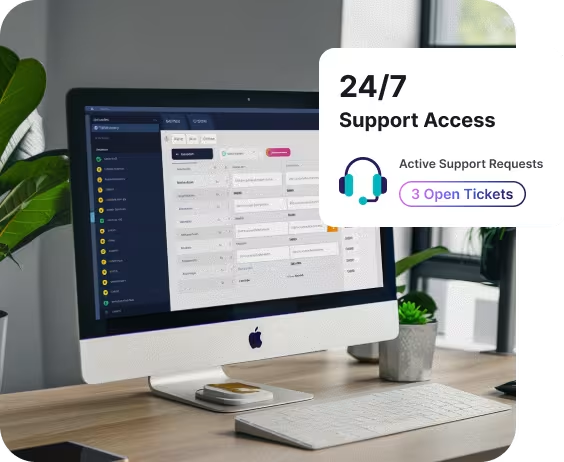



Real Human Support

Secure Access

Payment & Account Help

Clear Escalation Paths
The Data One Support Portal is designed for active merchants and partners who need reliable, ongoing assistance.
Inside the portal, you can —

View and manage support requests
Get help with payments, billing, and funding
Access account and technical assistance
Track updates and resolutions in one place
Support is organized, secure, and tied directly to your account — so nothing gets lost or delayed.
WHAT WE HELP WITH

Deposit timing and funding reviews
Declines and transaction investigations
Refunds and adjustments
Chargebacks and disputes


Statement questions and fee reviews
Account updates and documentation
Bank account changes
Pricing clarification

Terminal troubleshooting
POS communication issues
Gateway and API questions
Payment processing errors

PCI guidance
Fraud and risk inquiries
Verification or documentation requests
Compliance-related notices
If it impacts how you accept or manage payments, our support team can help guide resolution.

Best for —

Tap-to-pay & chip cards
Chargebacks or disputes
Documentation requests
Tap-to-pay Ongoing ticket tracking& chip cards
Technical investigations requiring follow-up
The portal ties your request directly to your merchant account for secure, documented support.

Best for —
Quick operational questions
Basic troubleshooting
Status updates
General assistance during business hours
Best for —
Urgent operational disruptions
Terminal outages
Time-sensitive payment issues
Display hours clearly again.
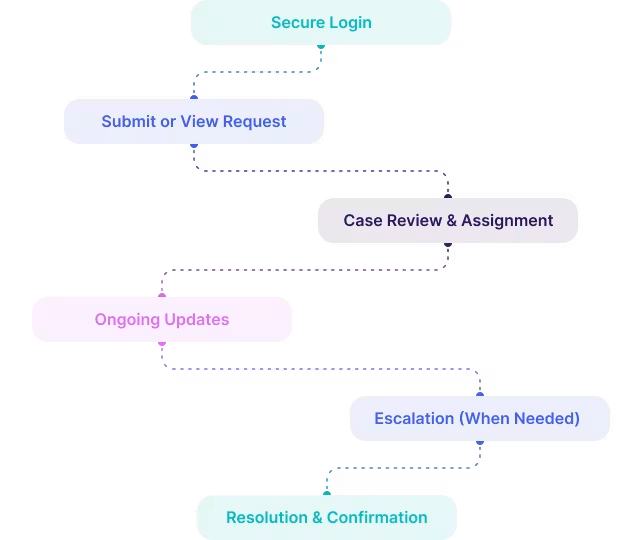
We believe good support should feel predictable and transparent.
Inside the portal, you can —
Log in securely to the Support Portal
Submit or view a support request
Get updates and responses in one place
Escalate when timing or impact matters
Work directly with experienced specialists
No endless ticket loops.
No generic responses.
Just clear communication and progress.
SECURITY
ACCESS
Support often involves sensitive financial and operational information. All portal requests are securely tied to your merchant account to ensure accuracy, documentation, and protection.

Secure Login Required

Encrypted Communication

Account-Level History

Clear Escalation Paths
Do NOT overemphasize role-based access unless you truly serve enterprise teams.
The portal ties your request directly to your merchant account for secure, documented support.
⏺ Account-specific issues
⏺ Chargebacks or disputes
⏺ Documentation requests
⏺ Ongoing ticket tracking
⏺ Technical investigations requiring follow-up
⏺ Quick operational questions
⏺ Basic troubleshooting
⏺ Status updates
⏺ General assistance during business hours
⏺ Urgent operational disruptions
⏺ Terminal outages
⏺ Ongoing ticket tracking
Display hours clearly again.

Many platforms treat support as a cost center, handled by scripts and ticket queues.
Data One treats it as a partnership — with real people who understand your setup and step in when it matters.
What makes our support different
Real humans, not scripts
Payment and operations expertise
Clear escalation paths
Support that understands your setup
Ongoing help — not just onboarding
We’re here to keep your business running smoothly — not just close tickets.
FAQ
Quick answers to common questions about our solutions, setup, and how we support your business.
Trusted by Small and Growing Businesses Across Key Industries












Log in to manage support requests, get expert help, and stay informed — all in one secure place.


All rights reserved @ 2026
.svg)


